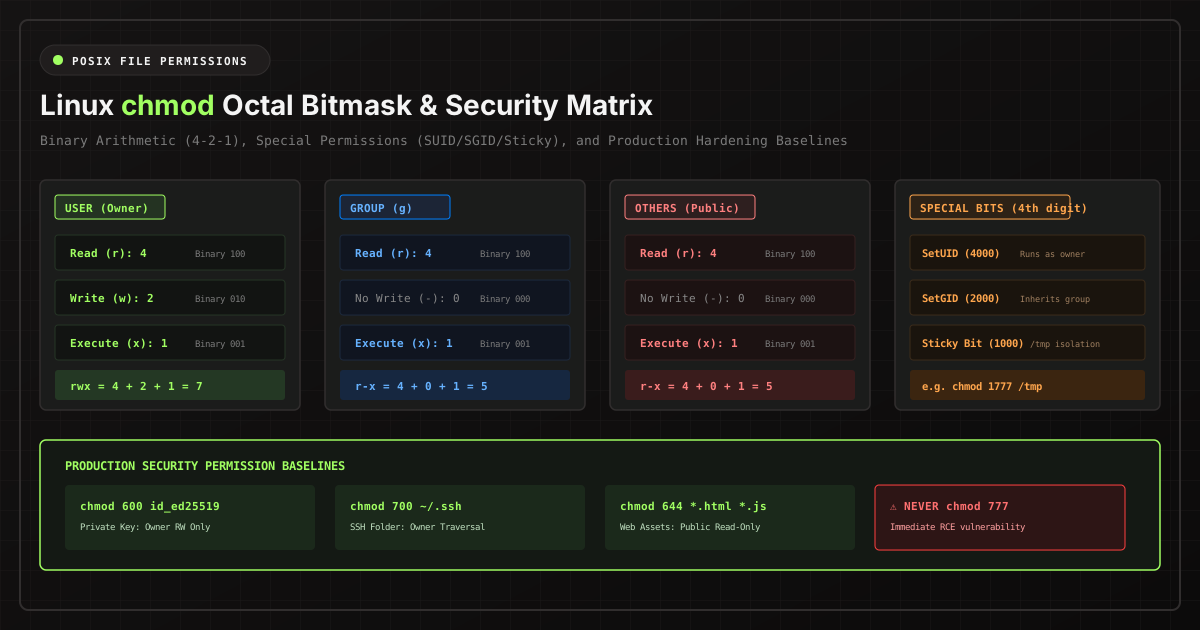
Every software engineer and systems administrator has encountered permission errors on a Linux server. And far too often, the hasty response is running chmod -R 777 /var/www. While this seemingly solves the immediate access issue, it creates a catastrophic security hole that leaves production servers vulnerable to arbitrary remote code execution.
Understanding the mathematical foundations of the POSIX permission model is critical for any developer deploying applications to Linux VPS instances, Docker containers, or Kubernetes pods.
The Binary Architecture of Octal Permissions
In the POSIX file system model, every file and directory has three distinct permission scopes:
- Owner (User - u): The individual user account that owns the file.
- Group (g): The system group assigned to the file, allowing shared team access.
- Others (Public - o): Every other system user, daemon, and unprivileged service.
For each scope, three discrete permission flags can be granted, mapped directly to binary bits:
| Permission | Symbol | Binary Value | Octal Weight |
|---|---|---|---|
| Read | r |
100 |
4 |
| Write | w |
010 |
2 |
| Execute | x |
001 |
1 |
By summing these weights, you derive the octal value for each scope:
rwx = 4 + 2 + 1 = 7 (Full Access)
rw- = 4 + 2 + 0 = 6 (Read & Write)
r-x = 4 + 0 + 1 = 5 (Read & Execute)
r-- = 4 + 0 + 0 = 4 (Read Only)
--- = 0 + 0 + 0 = 0 (Zero Access)
Therefore, a mode of 0755 signifies: Owner has 7 (rwx), Group has 5 (r-x), and Others have 5 (r-x).
Why chmod 777 is a Critical Security Vulnerability
Granting 777 gives every process on the entire operating system write permission to modify, overwrite, or truncate the file. If an attacker identifies an unvalidated file upload vulnerability in an application running under the www-data user, a 777 webroot allows them to overwrite application entrypoints, inject web shells, or replace system binaries.
Advanced POSIX Security: SUID, SGID, and the Sticky Bit
Beyond standard user/group/other bits, Linux kernels provide a fourth octal digit representing special security flags:
-
SetUID (SUID - Octal 4000): When an executable with SetUID is run, it executes with the privileges of the file's owner rather than the user invoking it. A classic example is
/usr/bin/passwd, which requires root privileges to update/etc/shadoweven when run by an unprivileged user. - SetGID (SGID - Octal 2000): On executable files, it executes with group permissions. On directories, SGID forces all newly created child files to automatically inherit the parent directory's group ID, enabling frictionless multi-user team collaboration.
-
Sticky Bit (Octal 1000): When set on a shared directory (such as
/tmp), the Sticky Bit prevents users from deleting or renaming files owned by other accounts, even if the directory has general write permissions.
Hardened Production Permission Baselines
Adhere to the following enterprise-standard permission baselines for common server assets:
# SSH Private Key (Owner Read/Write Only)
chmod 600 ~/.ssh/id_ed25519

# SSH Public Key (Owner RW, Others Read)
chmod 644 ~/.ssh/id_ed25519.pub

# SSH Config Directory (Owner Full Access Only)
chmod 700 ~/.ssh

# Web Server Static Assets (HTML, CSS, JS)
find /var/www/html -type f -exec chmod 644 {} +

# Web Server Directories (Executable for traversal)
find /var/www/html -type d -exec chmod 755 {} +

# Sensitive Production Config / Environment (.env)
chmod 600 /var/www/app/.env
Use our interactive Linux Chmod Permissions Calculator to visually inspect octal values, symbolic syntax, and special bits in real time.