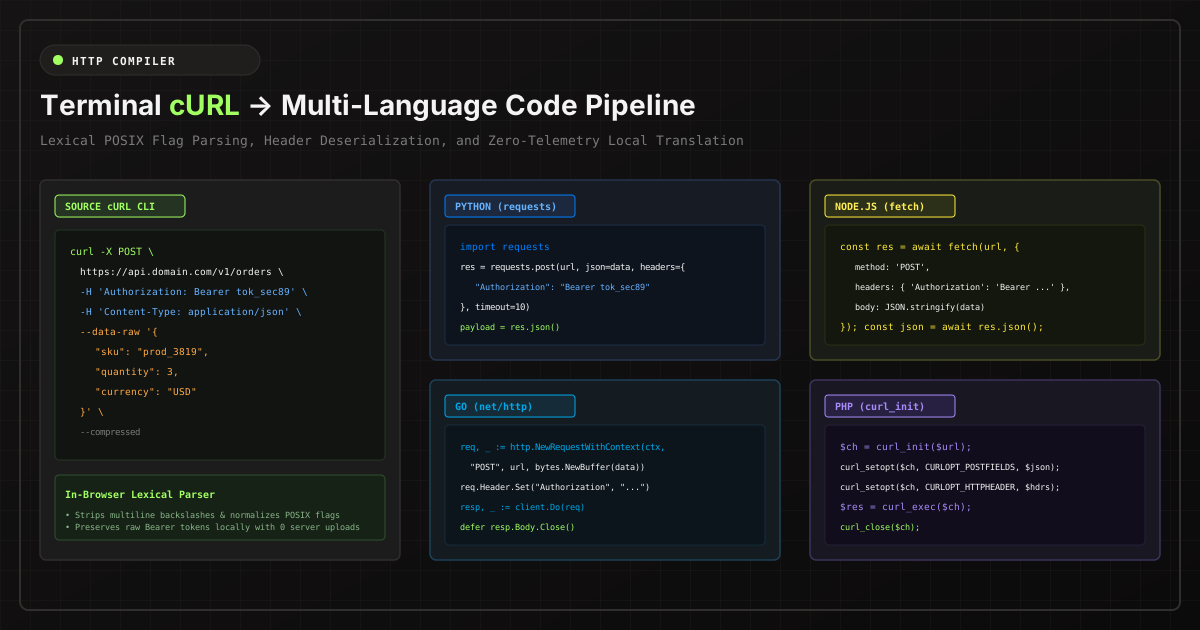
When reverse engineering an internal REST API or testing webhook endpoints from an external vendor, opening Chrome or Edge DevTools, right-clicking a network call, and selecting Copy as cURL is the fastest workflow in software engineering.
However, translating that verbose terminal command into clean, idiomatic code for your production microservices (Python requests, Node.js native fetch, Go net/http, or PHP cURL) is fraught with syntax edge cases and severe security hazards.
The Security Danger: Leaking Session Tokens to Online Converters
A raw browser cURL snippet is not just a URL. It almost always includes:
- Authorization Headers: Live Bearer JWTs, OAuth access tokens, or Basic Auth base64 hashes.
- Session Cookies: Full
Cookie: session_id=...strings with administrative privileges. - Proprietary Payload Data: Internal JSON bodies containing customer data or tenant secrets.
When developers paste these commands into generic cloud-hosted converters, those authorization headers are transmitted to remote servers and indexed in web server access logs. An engineer merely trying to convert a POST request can inadvertently cause an enterprise session hijacking incident.
Parsing Nuances: Deconstructing Complex cURL Commands
Translating cURL requires precise lexical parsing of POSIX command-line arguments:
- Header Extraction (
-H / --header): Headers must be normalized into language-specific key-value dictionaries. Certain headers (likeContent-LengthorHost) should be omitted as modern HTTP runtimes compute them automatically. - HTTP Method Resolution (
-X / --requestvs. Implicit Methods): If a cURL command specifies-d / --datawithout an explicit-X, POSIX standards dictate that the HTTP method automatically defaults toPOST. - Data Serialization (
--data-rawvs.--data-urlencode): Raw JSON strings must be parsed to detect whether they represent JSON payloads, form-encoded key-value pairs, or binary uploads. - Authentication Flags (
-u / --user): Username and password parameters must be translated into native Basic Authentication headers or client credentials.
Translating to Production-Ready Idioms
Compare how a standardized cURL command maps across modern language runtimes:
1. Python requests with Connection Pooling
import requests

url = "https://api.example.com/v1/orders"
headers = {
    "Authorization": "Bearer YOUR_ACCESS_TOKEN",
    "Content-Type": "application/json"
}
payload = {
    "order_id": "ord_8923",
    "amount": 4900
}

response = requests.post(url, json=payload, headers=headers, timeout=10)
response.raise_for_status()
data = response.json()
2. Modern Node.js / Bun Native fetch()
const response = await fetch('https://api.example.com/v1/orders', {
  method: 'POST',
  headers: {
    'Authorization': 'Bearer YOUR_ACCESS_TOKEN',
    'Content-Type': 'application/json'
  },
  body: JSON.stringify({
    order_id: 'ord_8923',
    amount: 4900
  }),
  signal: AbortSignal.timeout(10000)
});

if (!response.ok) {
  throw new Error(`HTTP error! status: ${response.status}`);
}
const data = await response.json();
3. High-Throughput Go net/http
ctx, cancel := context.WithTimeout(context.Background(), 10*time.Second)
defer cancel()

req, err := http.NewRequestWithContext(ctx, "POST", "https://api.example.com/v1/orders", bytes.NewBuffer(jsonData))
if err != nil {
    log.Fatal(err)
}
req.Header.Set("Authorization", "Bearer YOUR_ACCESS_TOKEN")
req.Header.Set("Content-Type", "application/json")

resp, err := client.Do(req)
if err != nil {
    log.Fatal(err)
}
defer resp.Body.Close()
Pure In-Browser Conversion with Zero Data Egress
To ensure your production tokens and session cookies never leak, execute all translations client-side. Our In-Browser cURL to Code Converter runs a 100% local tokenizer in browser JavaScript. No requests are ever dispatched to external servers.