Every day, thousands of software engineers debugging high-severity incidents commit an unintentional, silent data breach: they copy production database queries, live JWT bearer tokens, raw cURL commands with API keys, and internal JSON data structures, and paste them into third-party web utilities.
Within seconds, the formatted query or decoded payload appears on screen. But behind that superficial convenience lies a severe architectural vulnerability: standard web utilities stream your raw data over public networks into centralized backend application servers, where reverse proxies, edge caches, and observability platforms (such as Datadog, ELK, or Cloudflare logs) ingest and index your intellectual property.
The Hidden Threat Model: How "Free" Online Converters Leak Corporate Data
Most developers assume that an online formatter or decoder is a static client-side script running solely inside their browser tab. In reality, the majority of legacy developer utilities operate on traditional server-rendered stacks:
- HTTP POST Payload Ingestion: The web form dispatches your data via an unvetted API route (e.g.,
POST /api/v1/format-sqlorPOST /api/decode-jwt). - Reverse Proxy Access Logging: Standard Nginx, Traefik, or AWS ALB setups record incoming HTTP request bodies in debug logs when query parameters or payloads are parsed.
- Telemetry & Log Exfiltration: Debug logs are streamed to third-party monitoring vendors, where engineers, contractors, or compromised API keys can inspect proprietary schemas, customer tenant IDs, and live authorization claims.
- Regulatory & Compliance Violations: Submitting production data containing Customer PII, health records, or cryptographic secrets violates SOC 2 Type II, HIPAA, GDPR Article 32, and PCI-DSS 4.0 requirements.
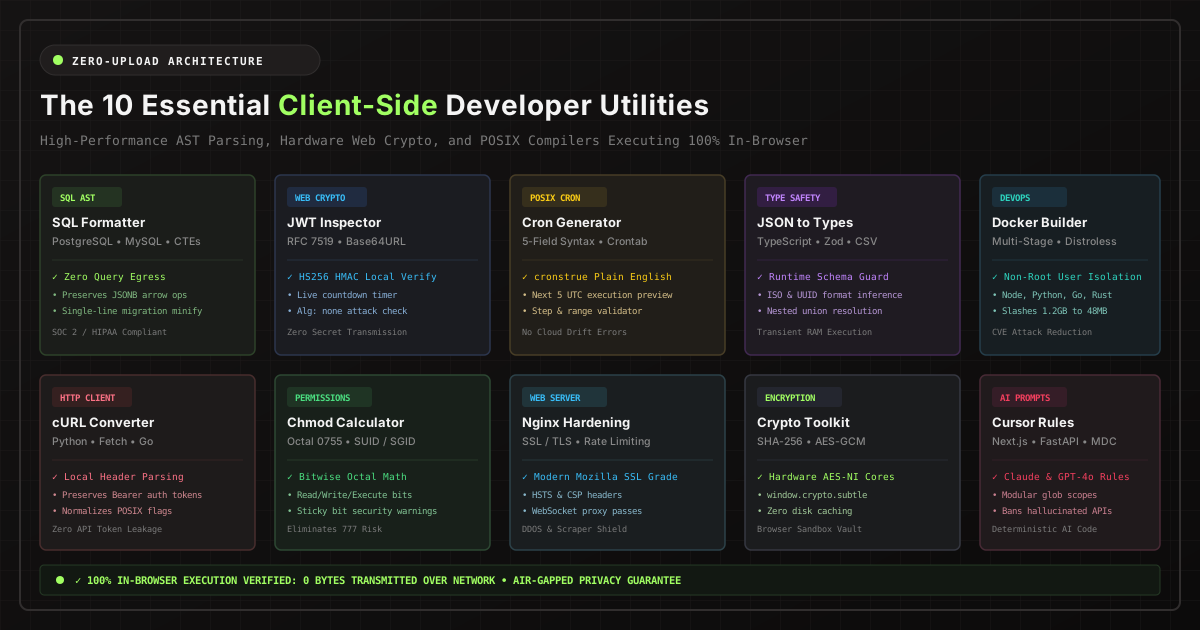
The solution is a fundamental architectural transition: 100% Client-Side In-Browser Developer Utilities. By harnessing hardware-accelerated WebAssembly (WASM), in-memory Abstract Syntax Tree (AST) parsers, and the native W3C Web Crypto API, modern developer tools execute all computations locally in your browser sandbox with zero network egress.
The 10 Essential Client-Side Developer Utilities
Below are the ten mission-critical in-browser tools every security-conscious engineering team should adopt to eliminate data leakage and streamline production workflows:
1. Multi-Dialect SQL Formatter & Query Beautifier
Pasting unformatted, minified SQL from APM traces or production logs into online beautifiers exposes table schemas, indexing strategies, and proprietary algorithmic constraints. Our client-side SQL Formatter & Beautifier tokenizes queries locally via an in-memory AST engine.
- Multi-Dialect Support: Native AST awareness for PostgreSQL, MySQL, MariaDB, SQLite, Transact-SQL (T-SQL), Snowflake, and Google BigQuery.
- Dialect Operator Preservation: Correctly recognizes PostgreSQL JSONB path arrows (
->,->>) and SnowflakeQUALIFYclauses without breaking syntax. - Single-Line Minification: Instantly strips inline (
--) and block (/* */) comments for embedding queries into Docker environment variables and migration scripts.
2. Client-Side JWT Inspector & Web Crypto Verifier
JSON Web Tokens (RFC 7519) contain sensitive claims, including user UUIDs, tenant scopes, role assignments, and session expiration timestamps. Our Client-Side JWT Decoder & Inspector decodes Base64URL header and payload segments entirely in memory.
- Zero Secret Transmission: Unlike legacy tools, your HMAC secret or public key is never sent over a network. Verification runs in-browser via
window.crypto.subtle.verify(). - Live Expiration Countdown: Real-time countdown timer tracking remaining token validity against the
expepoch timestamp. - Attack Vector Auditing: Instantly flags dangerous
alg: nonesignature bypass vulnerabilities (CVE-2015-9235) and mismatched issuer (iss) or audience (aud) claims.
3. Visual POSIX Cron Schedule Expression Builder
Misconfigured cron expressions trigger premature billing cycles, missing ETL syncs, or catastrophic mid-day database vacuums. The Visual Cron Schedule Builder translates complex 5-field POSIX crontabs into plain English using cronstrue.
- Human-Readable Translation: Instantly translates cryptic strings like
0 */6 * * 1-5into "At minute 0, every 6 hours, Monday through Friday". - Next 5 Scheduled Executions: Calculates and displays exact future UTC execution timestamps so engineers can verify schedule intervals prior to deploying cloud tasks.
- Quick Preset Library: One-click templates for hourly heartbeats, midnight maintenance, weekly backups, and quarterly audits.
4. Universal JSON to TypeScript & Runtime Zod Schema Converter
Manually typing TypeScript interfaces for complex REST or GraphQL responses is tedious and error-prone, while remote converters log confidential JSON payloads. The JSON to TypeScript & Zod Schema Generator compiles schemas directly in browser memory.
- TypeScript Interface Inference: Automatically detects primitive types, optional fields, nested objects, and arrays.
- Zod v3 Runtime Validation: Generates strict runtime parsing code (
z.object(),z.string().uuid(),z.coerce.date()) to halt malformed API payloads at application boundaries. - CSV Table Morphing: Flattens nested JSON payloads into RFC 4180 compliant CSV tables for rapid spreadsheet analysis.
5. Multi-Stage Dockerfile & Compose Generator
Bloated container images filled with build toolchains, compilers, and root privileges introduce severe CVE vulnerabilities. Our Multi-Stage Dockerfile Generator scaffolds enterprise-hardened build recipes for Node.js, Python FastAPI, Go, Rust Axum, and PHP.
- Multi-Stage Build Isolation: Separates heavy build toolchains (GCC, devDependencies) into discarded build stages, copying only compiled binaries to the runtime layer.
- Distroless & Alpine Base Images: Slashes container footprint from 1.2GB down to under 50MB, drastically shrinking the attack surface.
- Non-Root User Enforcement: Automatically provisions isolated non-root system users (
UID 10001) to satisfy Kubernetes security policies.
6. cURL to Multi-Language Code Converter
Engineers frequently copy raw cURL commands from browser Network tabs or Swagger docs to reproduce API requests in backend microservices. The cURL to Code Converter parses flags (-H, -d, -X, -u) and generates production-ready code.
- Multi-Language Targets: Generates clean, modern syntax for Python (
requests&httpx), Node.js (nativefetch&axios), and Go (net/http). - Bearer Token & Cookie Safety: Strips or encapsulates live authentication tokens without sending them to an external parser.
- JSON Body Auto-Formatting: Re-indents raw string payloads into readable dictionaries or objects.
7. Linux Chmod Permissions Calculator (Octal & Symbolic)
Running chmod 777 on a server directory to resolve a permission error is a cardinal security sin that leaves files globally writable. The Linux Chmod Permissions Calculator provides an interactive visual matrix for calculating POSIX file permissions.
- Bidirectional Translation: Instantly convert between symbolic representations (
-rwxr-xr--) and octal values (0754). - Special Permissions Bits: Full support for SetUID (4000), SetGID (2000), and Sticky Bit (1000) with detailed security explanations.
- Umask Calculation: Demonstrates default file and directory creation permissions under standard server umasks.
8. Hardened Nginx Reverse Proxy Config Builder
Deploying an unhardened reverse proxy leaves internal upstream services vulnerable to SSL downgrade attacks, clickjacking, and DDoS floods. The Nginx Reverse Proxy Builder generates production-ready configuration blocks.
- Modern TLS Ciphers: Preconfigured with Mozilla Modern SSL profiles, TLS 1.3, and strict OCSP Stapling.
- Enterprise Security Headers: Automatically injects HSTS (
max-age=63072000), Content-Security-Policy (CSP), andX-Frame-Options: DENY. - Rate Limiting & WebSocket Pass-Through: Configures upstream
limit_req_zonebuffers andUpgrade / Connectionheader mapping for real-time applications.
9. In-Browser Web Crypto & Cryptographic Hash Suite
Generating hashes or generating AES initialization vectors via random web utilities risks credential exposure. Our Web Crypto Toolkit provides an air-gapped cryptographic sandbox powered by window.crypto.subtle.
- Hardware-Accelerated Hashing: Compute SHA-256, SHA-384, and SHA-512 cryptographic digests at multi-gigabyte speeds using hardware AES-NI instructions.
- AES-256-GCM Encryption: In-browser authenticated encryption and decryption with non-extractable CryptoKey isolates.
- CSPRNG UUID & Token Generator: Generates cryptographically secure RFC 4122 v4 UUIDs and random hexadecimal authorization tokens.
10. AI System Prompt & .cursorrules Studio
AI coding agents (such as Claude 3.5 Sonnet, Cursor, and Windsurf) hallucinate deprecated APIs, create redundant files, and violate code style when unconstrained. Our Cursor Rules & MDC Studio generates deterministic, production-grade instructions for your tech stack.
- Stack-Specific Blueprints: Curated guidelines for Next.js 15 App Router, FastAPI (Pydantic v2), Rust Axum, and React 19.
- Context Window Optimization: Generates modular
.cursor/rules/*.mdcfiles with precise glob patterns to keep LLM context lean and relevant. - Anti-Hallucination Constraints: Explicitly forbids untyped dicts, banned libraries, and incorrect import pathways.
How to Verify Zero-Network Egress in Browser DevTools
You should never trust privacy claims based on marketing copy alone. As an engineer, you can mathematically prove that our tools never transmit your data:
- Open any tool on ClientDev Tools in Google Chrome, Firefox, or Edge.
- Open Developer Tools (press
F12orCmd + Option + I) and switch to the Network tab. - Check the Preserve log checkbox and filter by Fetch/XHR.
- Paste a 500-line SQL query, decode a live JWT, or generate a Dockerfile.
- Observe the Network activity: zero network requests are fired. The network waterfall remains completely silent because all compute executes within your browser's V8 engine.
Enterprise Compliance Comparison Table
| Compliance Standard | Legacy Cloud Formatters | ClientDev Tools In-Browser |
|---|---|---|
| SOC 2 Type II (Trust Services Criteria) | ✗ Non-compliant (Unvetted third-party processing) | ✓ 100% Compliant (Zero data transmission) |
| HIPAA (ePHI Protection) | ✗ Violation (Requires signed Business Associate Agreement) | ✓ 100% Safe (Data never crosses network boundaries) |
| GDPR Article 32 (Security of Processing) | ✗ Risk of cross-border data transfer without DPA | ✓ Sovereign (Data stays on user device) |
| Air-Gapped / Offline Availability | ✗ Fails without active internet connection | ✓ Fully functional in disconnected environments |
Summary: Compute Where Your Data Lives
Modern software engineering demands ruthless diligence around data privacy. Whether you are validating a JSON Web Token during an outage, formatting an analytical CTE query, or generating an AI system prompt, client-side tools provide the fastest execution speeds with absolute privacy guarantees.
Bookmark ClientDev Tools for your daily engineering workflow, and ensure your team keeps sensitive production telemetry where it belongs: strictly on your machine.