Whether you are scheduling an automated database backup at 2:00 AM UTC, running an hourly cache invalidation worker, or orchestrating distributed Kubernetes CronJobs, mastering cron syntax is a foundational skill for every backend engineer, DevOps specialist, and systems architect.
Yet, despite being introduced in Unix Version 7 in 1979, cron expressions remain one of the most frequent sources of silent production bugs: jobs triggering twice unexpectedly, missed monthly billing cycles due to 31-day assumptions, or server CPU spikes caused by runaway concurrent executions.
This comprehensive guide provides an authoritative Cron Syntax Cheatsheet, a breakdown of special operators, an analysis of cloud scheduler variations (AWS EventBridge vs. POSIX), and interactive tools to test and validate your schedules before deploying to production.
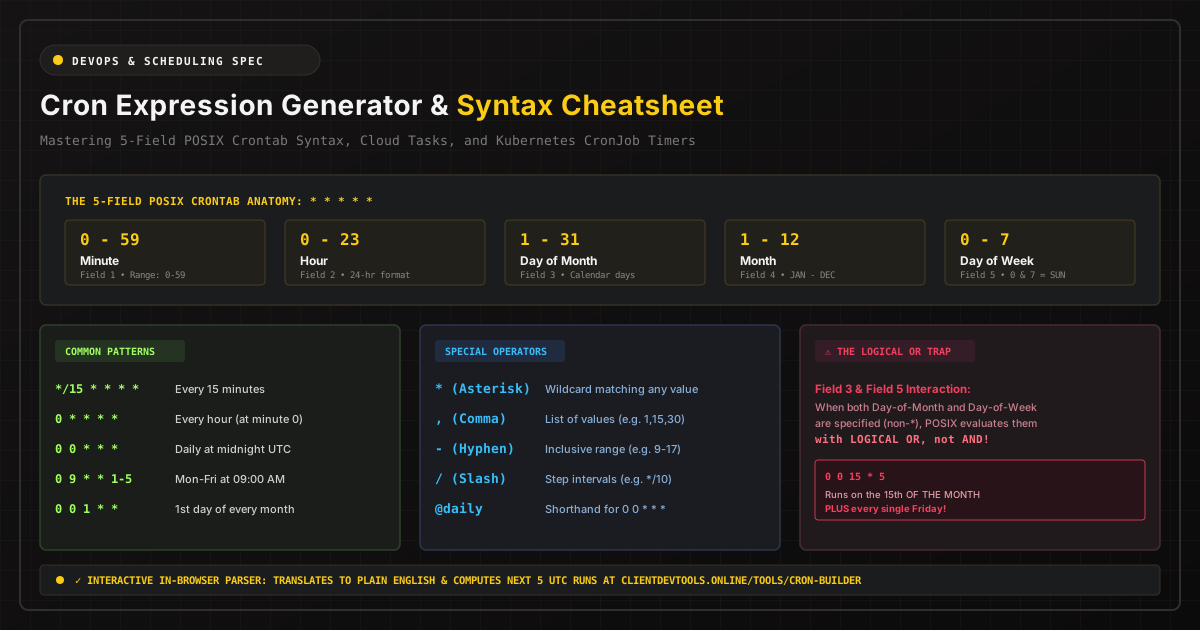
The 5-Field POSIX Crontab Anatomy
In standard Linux, Unix, and Kubernetes environments, a cron expression consists of exactly five space-separated fields representing distinct units of time:
| Field Position | Time Unit | Allowed Range | Allowed Special Characters |
|---|---|---|---|
| Field 1 | Minute | 0 – 59 | * , - / |
| Field 2 | Hour | 0 – 23 (24-hour military clock) | * , - / |
| Field 3 | Day of Month | 1 – 31 | * , - / |
| Field 4 | Month | 1 – 12 (or JAN – DEC) | * , - / |
| Field 5 | Day of Week | 0 – 7 (0 & 7 = Sunday, or SUN – SAT) | * , - / |
To visualize and test any combination in real time with plain-English translations and future UTC run calculations, use our companion In-Browser Visual Cron Schedule Builder.
Special Operators Explained
Special operators allow you to define recurring intervals, multiple execution points, and discrete bounds within each field:
- Asterisk (
*) — Wildcard: Matches all possible values within that field. A*in the minute field means "every minute"; a*in the month field means "every month". - Comma (
,) — Value List: Specifies multiple discrete values. For example,15,45 * * * *executes at the 15th and 45th minute of every hour. - Hyphen (
-) — Inclusive Range: Defines a continuous range of numbers. For example,0 9-17 * * *triggers at minute 0 of every hour between 9:00 AM and 5:00 PM (9, 10, 11, 12, 13, 14, 15, 16, 17). - Slash (
/) — Step Values: Specifies increments through a range. For example,*/15 * * * *in the minute field triggers every 15 minutes (at :00, :15, :30, :45). Similarly,0 0/2 * * *executes every 2 hours starting at midnight.
Common Production Cron Patterns (Copy & Paste Cheatsheet)
Below is a curated reference of the most frequently used production cron expressions across backend and cloud systems:
| Schedule Description | Cron Expression | Human Translation (via cronstrue) |
|---|---|---|
| Every minute | * * * * * |
Every minute |
| Every 5 minutes | */5 * * * * |
Every 5 minutes |
| Every 15 minutes | */15 * * * * |
Every 15 minutes |
| Every 30 minutes | */30 * * * * |
Every 30 minutes |
| Hourly at top of the hour | 0 * * * * |
At minute 0 of every hour |
| Every 2 hours | 0 */2 * * * |
At minute 0, every 2 hours |
| Every 6 hours | 0 */6 * * * |
At minute 0, every 6 hours |
| Daily at Midnight UTC | 0 0 * * * |
At 12:00 AM every day |
| Daily at 03:30 AM | 30 3 * * * |
At 03:30 AM every day |
| Every weekday (Mon - Fri) at 9:00 AM | 0 9 * * 1-5 |
At 09:00 AM, Monday through Friday |
| Every weekend (Sat & Sun) at Midnight | 0 0 * * 6,0 |
At 12:00 AM, Saturday and Sunday |
| Weekly on Sunday at 02:00 AM | 0 2 * * 0 |
At 02:00 AM, on Sunday |
| First day of every month at Midnight | 0 0 1 * * |
At 12:00 AM, on day 1 of the month |
| Quarterly (Jan, Apr, Jul, Oct 1st) | 0 0 1 1,4,7,10 * |
At 12:00 AM, on day 1 of Jan, Apr, Jul, Oct |
| Once a year on January 1st | 0 0 1 1 * |
At 12:00 AM, on day 1 of January |
The Dangerous POSIX Cron Trap: Field 3 vs. Field 5 Logical OR
The single most prevalent pitfall in cron engineering involves the interaction between Field 3 (Day of Month) and Field 5 (Day of Week).
Engineers frequently attempt to schedule a job to execute on "the 15th of the month, but only if it falls on a Friday":
# DANGEROUS INTENT MISMATCH:
0 0 15 * 5
Under the POSIX crontab specification, when both Field 3 and Field 5 are non-wildcard values (neither is an asterisk *), the evaluation logic is LOGICAL OR, NOT LOGICAL AND:
POSIX Execution Rule: The command is executed if EITHER the current Day-of-Month matches Field 3, OR the current Day-of-Week matches Field 5.
As a consequence, the expression 0 0 15 * 5 will execute:
- On the 15th day of every month, regardless of what day of the week it is.
- PLUS every single Friday of every month!
If you truly need to restrict a job to execute on the 15th of the month only when it is a Friday, you must execute the schedule daily and perform the conditional check inside your application code or shell wrapper:
# Proper Shell Guard in standard crontab:
0 0 15 * * [ $(date +%u) -eq 5 ] && /usr/local/bin/run-task.sh
Cloud Cron vs. Standard POSIX: Key Architectural Differences
Modern cloud platforms have diverged from the classic 5-field POSIX syntax. When writing cron configurations for AWS, Google Cloud, or Azure, keep these differences in mind:
1. AWS EventBridge & CloudWatch (6-Field Syntax)
AWS EventBridge requires 6 fields (Minute, Hour, Day-of-month, Month, Day-of-week, Year). Furthermore, AWS prohibits specifying both Day-of-Month and Day-of-Week simultaneously; one of the two fields must be the question mark (?) wildcard to prevent the POSIX OR ambiguity:
# AWS EventBridge: Daily at 10:00 AM UTC (Note the '?' for Day-of-week)
cron(0 10 ? * * *)

# AWS EventBridge: Every Monday through Friday at 18:00 UTC (Note the '?' for Day-of-month)
cron(0 18 ? * MON-FRI *)
2. Kubernetes CronJobs (POSIX Compliant with Concurrency Policies)
Kubernetes uses standard 5-field POSIX cron syntax in its CronJob manifest specification. However, Kubernetes introduces a critical resilience setting: concurrencyPolicy.
apiVersion: batch/v1
kind: CronJob
metadata:
  name: nightly-cache-compaction
spec:
  schedule: "0 2 * * *" # Standard 5-field POSIX syntax
  concurrencyPolicy: Forbid # Options: Allow (default), Forbid, Replace
  successfulJobsHistoryLimit: 3
  failedJobsHistoryLimit: 1
  jobTemplate:
    spec:
      template:
        spec:
          containers:
          - name: worker
            image: internal-registry.company.com/worker:v2.4
          restartPolicy: OnFailure
Always configure concurrencyPolicy: Forbid for batch ETL and backup tasks. If an execution exceeds its allotted time window, Kubernetes will skip subsequent scheduled runs rather than spawning parallel instances that contend for database locks.
Timezone Drift: Why Production Schedulers Must Run in UTC
One of the most catastrophic operational failures occurs during Daylight Saving Time (DST) transitions. If a cron scheduler runs in local server time (e.g., America/New_York or Europe/London):
- Spring Forward: The clock jumps from 01:59 AM to 03:00 AM. Any cron job scheduled between 02:00 AM and 02:59 AM never executes.
- Fall Back: The clock repeats the hour between 01:00 AM and 02:00 AM. Any job scheduled in that window executes twice.
To prevent daylight drift, enterprise systems maintain an ironclad rule: Configure all host operating systems, Kubernetes worker nodes, and database schedulers to UTC (Coordinated Universal Time).
Summary & Developer Resources
Writing reliable cron schedules requires clear understanding of the 5-field matrix, avoidance of the logical OR trap, and strict adherence to UTC time standards.
Instead of guessing or deploying untested schedules to production, use our Client-Side Cron Schedule Builder to visually construct expressions, verify cronstrue English translations, and calculate future UTC execution timestamps 100% in your browser.