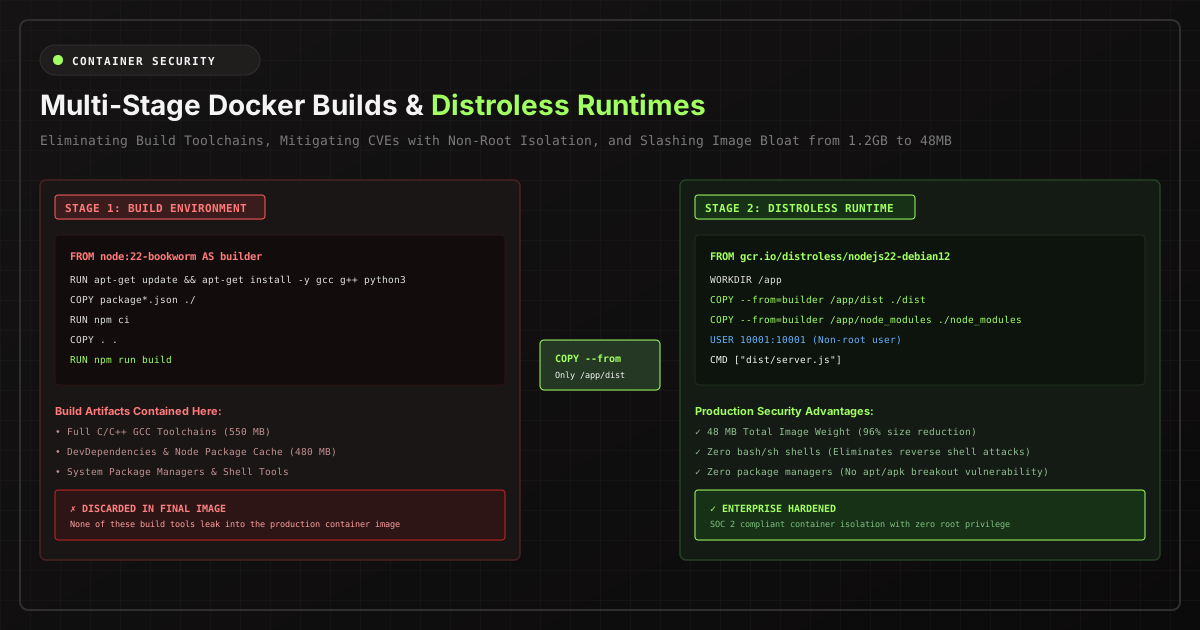
In containerized cloud infrastructure, container image bloat is more than an inconvenience during docker pull — it is a severe attack surface multiplier, a source of deployment lag, and an avoidable drain on cloud bandwidth billing.
A default Node.js or Python Dockerfile created without multi-stage isolation frequently tops 1.2 Gigabytes. Why? Because the final production artifact contains gcc toolchains, package manager caches (npm cache, pip wheel), test harnesses, header files, and an entire Linux distribution userspace that your application process will never execute.
The Multi-Stage Build Paradigm
Docker multi-stage builds (introduced in Docker 17.05) allow you to define multiple FROM instructions in a single Dockerfile. Each stage can use a distinct base image and selectively copy artifacts from previous stages, completely discarding intermediate compilers and build dependencies.
# ==============================================================================
# STAGE 1: Compilation & Dependency Resolution
# ==============================================================================
FROM node:22-bookworm-slim AS builder
WORKDIR /app

# Cache layer optimization: Copy lockfiles before source code
COPY package.json package-lock.json ./
RUN npm ci --include=dev

COPY . .
RUN npm run build && npm prune --production

# ==============================================================================
# STAGE 2: Ultra-Minimal Production Runtime
# ==============================================================================
FROM gcr.io/distroless/nodejs22-debian12:nonroot AS runner
WORKDIR /app

# Only copy compiled JavaScript and production node_modules
COPY --from=builder /app/dist ./dist
COPY --from=builder /app/node_modules ./node_modules
COPY --from=builder /app/package.json ./package.json

USER nonroot:nonroot
EXPOSE 3000
CMD ["dist/server.js"]
Alpine vs. Distroless: What Belongs in Production?
Choosing the correct base runtime image requires balancing size against operational observability:
| Base Image | Base Size | Shell Included? | C Library | CVE Attack Surface |
|---|---|---|---|---|
| Ubuntu / Debian | 120 MB+ | Yes (bash/sh) | glibc | High (100+ packages) |
| Alpine Linux | 7.3 MB | Yes (ash/sh) | musl libc | Low (occasional musl quirks) |
| Google Distroless | 20 - 45 MB | NO SHELL | glibc | Near Zero (CVE-free) |
Why Distroless wins for production security: If an attacker discovers a remote code execution (RCE) flaw in your web framework, their standard payload consists of spawning a shell (/bin/sh or /bin/bash) and invoking curl or wget to download malware. In a Distroless container, there is no shell, no package manager, and no curl. The exploit fails at the operating system execution boundary.
Production Cloud Hosting: Bare-Metal VPS vs. Managed Clusters
Once your containers are trimmed and hardened, deployment strategy dictates both your latency and your cloud bill:
- Self-Hosted Docker Compose on Dedicated VPS: For SaaS platforms with predictable workloads, hosting Docker Compose stacks on dedicated Linux compute like Hostinger KVM VPS (20% extra discount) delivers full root SSH access, dedicated NVMe read/write throughput, and zero per-container abstraction markups.
- Elastic Multi-Region Cloud Droplets: For scaling microservices with automated horizontal autoscaling and private VPC networking, deploying on DigitalOcean Cloud with $200 in free 60-day trial credits provides managed Kubernetes (DOKS) and private container registries with instantaneous cluster provisioning.
- Zero-DevOps Cloud Runtimes: For teams wanting GitHub branch previews and automated container builds without SSH key management, platforms like Railway offer turn-key rollouts with zero Docker daemon maintenance.
The Non-Root Execution Rule
Never run container processes as root (UID 0). If an escape vulnerability occurs in the container runtime (e.g. runc CVE-2024-21626), a root container process has root capabilities over the host kernel.
# Always enforce an unprivileged user before CMD
RUN addgroup -S appgroup && adduser -S appuser -G appgroup
USER appuser
Our browser-based Dockerfile & Compose Generator implements these multi-stage best practices automatically for Node.js, Python, Go, PHP, and Rust without transmitting any proprietary configuration code to external servers.