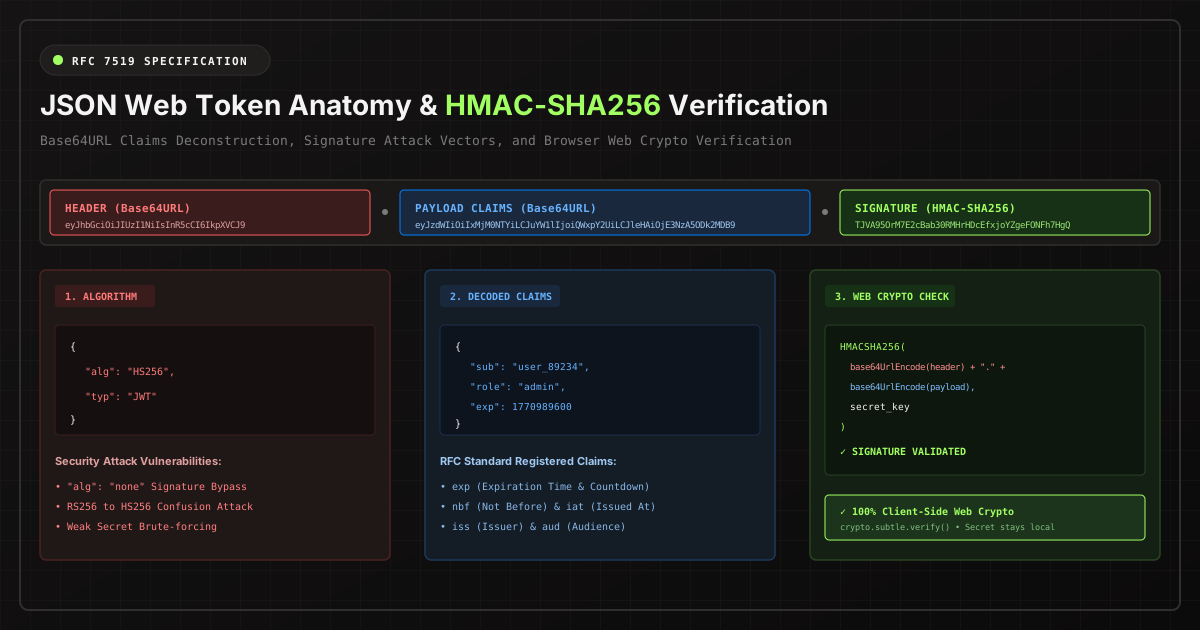
In modern microservice architectures, JSON Web Tokens (RFC 7519) are the de facto standard for stateless authorization. Yet misconceptions regarding how JWTs function continue to be a primary source of critical vulnerabilities in SaaS applications.
The Fundamental Misconception: Signed vs. Encrypted
The most pervasive security misconception among junior and mid-level engineers is that JSON Web Tokens protect the confidentiality of payload data.
Standard JWTs (JWS) are signed, NOT encrypted. Anyone who intercepts or possesses a JWT string can read every single field in the payload without knowing your secret key. The token is merely Base64URL encoded so it can be safely passed in HTTP headers (Authorization: Bearer <token>).
If you place sensitive PII, credit card numbers, or internal cryptographic seeds inside a standard JWT payload, you have published that information in plain text.
Anatomy of a Three-Part Token
A JWT consists of three segments separated by periods (.):
- Header: A JSON object specifying the token type and the cryptographic algorithm (e.g.
{"alg": "HS256", "typ": "JWT"}). - Payload: The body containing claims — statements about the entity (typically the user) and contextual metadata.
- Signature: A cryptographic hash calculated by signing
Base64URL(Header) + "." + Base64URL(Payload)using your private key or shared secret.
Two Devastating JWT Vulnerabilities You Must Guard Against
1. The Infamous "alg: none" Exploit (CVE-2015-9235)
The RFC specification allows an unsecured token where the algorithm is set to "none". In vulnerable libraries, if a malicious actor modifies the header to {"alg": "none"}, escalates their payload role from "user" to "admin", and strips the signature segment completely, the backend validation function returns valid = true!
Remediation: Modern verification middleware must explicitly whitelist allowed algorithms (e.g., exclusively ["RS256"] or ["HS256"]) and reject any token containing "none".
2. The Key Confusion Attack (RS256 vs. HS256)
In an asymmetric scheme (RS256), the authentication server signs tokens using a private RSA key, while consumer APIs verify signatures using a public RSA key published on a JWKS endpoint (/.well-known/jwks.json).
In a key confusion attack, an attacker fetches the public key (which is publicly readable by design), alters their token payload, and re-signs the token using the symmetric HS256 algorithm — using the public RSA key text as the secret HMAC key! If the backend verification function does not enforce the algorithm parameter, it will verify the HS256 signature using the public key string and accept the forged token.
In-Browser Cryptographic Verification with Web Crypto
You don't need external cloud servers to test and verify HMAC signatures. Modern browsers provide the window.crypto.subtle API, which allows hardware-accelerated signature verification in pure client-side TypeScript:
async function verifyHmac(token: string, secret: string): Promise<boolean> {
  const [headerB64, payloadB64, sigB64] = token.split('.');
  const data = new TextEncoder().encode(`${headerB64}.${payloadB64}`);

  // Import secret into browser crypto keystore
  const key = await window.crypto.subtle.importKey(
    'raw',
    new TextEncoder().encode(secret),
    { name: 'HMAC', hash: 'SHA-256' },
    false,
    ['verify']
  );

  // Decode Base64URL signature into bytes
  const sigBytes = Uint8Array.from(atob(sigB64.replace(/-/g, '+').replace(/_/g, '/')), c => c.charCodeAt(0));

  // Verify purely in local memory
  return await window.crypto.subtle.verify('HMAC', key, sigBytes, data);
}
This code executes entirely within your browser's private memory space. Your secrets never leave your device.